Data Acquisition
Data flows into a Bonsai workflow from ONIX hardware through data source operators, and back out to the hardware through data sink operators. This section covers how to use them.
Acquiring Data
Streaming data from ONIX hardware into Bonsai requires at least one data source operator.Place a data source operator and set its DeviceName property for every device from which you would like to stream. Setting the DeviceName property will tell the operator from which device to stream data. This is referred to as linking the data source operator to the device. Take this workflow for example:
AnalogInput's DeviceName property is set to "BreakoutBoard/AnalogIO" so it will stream data from the AnalogIO device on the breakout board.
Use Multiple Instances of Identical Hardware
When using multiple identical headstages or miniscopes, configuration operators
must be given unique Name properties so their devices can be distinguished.
When running more than one ONIX system on the same computer, each system's
configuration chain must be assigned a unique Index. The following sections
show how to do this.
Multiple headstages/miniscopes
Linking the data source operator to devices when using two identical headstages
or miniscopes involves an additional step: renaming a configuration operator.
Suppose you want to stream orientation data from two Neuropixels 2.0 Headstages
through using two PolledBno055Data operators. By default,
the ConfigureHeadstageNeuropixelsV2e operators are both
named "HeadstageNeuropixelsV2e". This causes their devices to also have
identical names, "HeadstageNeuropixelsV2e/PolledBno055". The two headstages and
their devices must be disambiguated. To do this, you must edit one or both of
headstages' Name property:
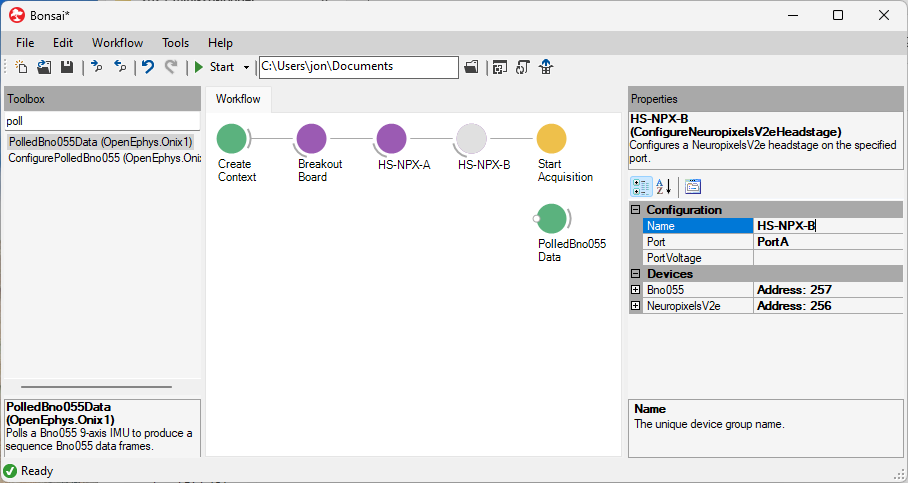
After this, the disambiguated source can be selected for each data operator
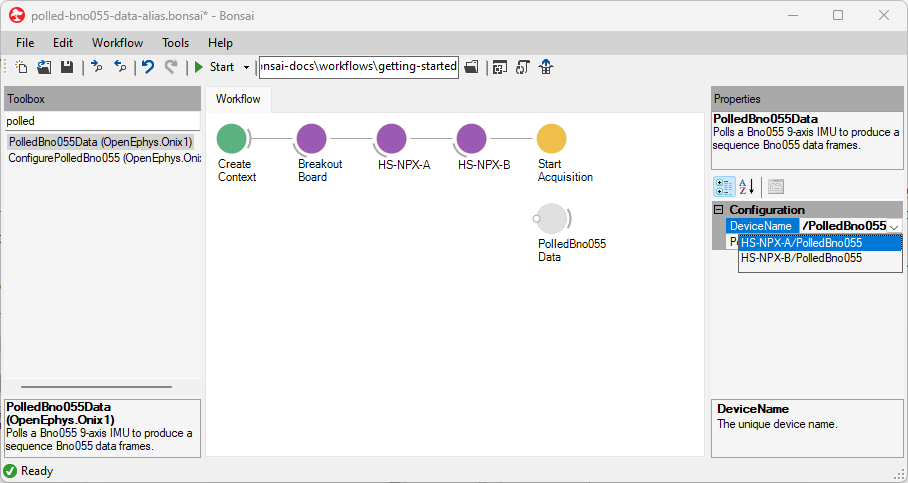
In the following workflow, the Name property of each
ConfigureHeadstageNeuropixelsV2e has been changed from
"HeadstageNeuropixelsV2e" to "HS-NPX-A" and "HS-NPX-B". The DeviceName of each
of the PolledBno055Data operators has been set to
"HS-NPX-A/PolledBno055" and "HS-NPX-B/PolledBno055" from the dropdown so each
operator will take data from a different headstage.
Multiple ONIX systems
If a second ONIX system is used on the same computer, a second configuration
chain operator is required. In this case, the Index property of the
configuration chain that corresponds to the second system should be set to 1. If
three systems are used, they would have Index values of 0, 1, and 2. etc.
Now that you can stream data into Bonsai from ONIX hardware, the next step is to visualize the data.